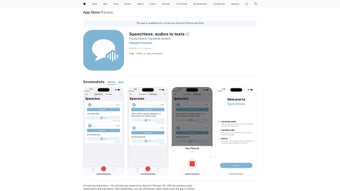

Download Speechless – Fast, Secure Audio‑to‑Text Conversion for iPhone, iPad & iPod touch
Overview
Speechless is a subscription‑based iOS‑only application that turns spoken audio into clean, readable text directly on your iPhone, iPad, or iPod touch. Designed with accessibility and productivity in mind, the app is ideal for anyone who prefers to read rather than listen—students capturing lecture notes, journalists transcribing interviews, podcasters converting episodes into show notes, or busy professionals turning meeting recordings into minutes. The interface follows Apple’s Human Interface Guidelines, offering a minimalist layout where a single tap initiates the transcription process.
Although the editing toolkit is intentionally lightweight, the service provides essential functions such as real‑time preview, on‑the‑fly correction, and multiple export options. By leveraging modern AI‑driven speech‑recognition models, Speechless achieves near‑real‑time conversion with accuracy rates that rival desktop‑grade software. The subscription model guarantees continuous updates, priority support, and cloud‑backed storage, ensuring the app stays secure and up‑to‑date across all supported iOS devices.
Whether you are commuting on a noisy subway, working in a silent office, or simply want to keep a written record of voice memos, Speechless delivers a reliable, privacy‑focused solution that integrates seamlessly with Apple’s ecosystem.
Key Features That Make Speechless Stand Out
- High‑Accuracy Transcription Engine: Powered by the latest AI‑driven speech‑to‑text models, Speechless delivers up to 95 % accuracy in quiet environments and continuously adapts to a wide range of accents and speaking styles.
- One‑Tap Audio Import: Import audio directly from recordings, voice memos, or share from other apps like WhatsApp, Zoom, Microsoft Teams, and even the native Files app with a single tap.
- Instant Text Preview: Watch a live preview of the transcription as it processes, allowing you to pause, resume, or jump to specific timestamps without losing progress.
- Export Options: Export transcriptions as plain text, PDF, or copy to clipboard; share via email, AirDrop, or cloud storage services such as iCloud, Dropbox, and Google Drive.
- Secure Cloud Sync: All transcriptions are encrypted in transit (TLS 1.3) and at rest (AES‑256), syncing automatically across every logged‑in Apple device for seamless access.
- Multi‑Language Support: Currently supports English, Spanish, French, German, and Mandarin, with additional language packs scheduled for release later in 2026.
- Subscription Benefits: Unlimited transcription minutes, priority customer support, and regular feature updates are included in the monthly ($9.99) or yearly ($79.99) plan.
- Accessibility‑First Design: Large fonts, high‑contrast mode, and full VoiceOver compatibility make the app usable for visually impaired users, complying with WCAG 2.1 AA standards.
- Offline Mode: When an internet connection is unavailable, Speechless switches to on‑device CoreML processing, ensuring you can still transcribe without compromising data privacy.
- Batch Processing: Queue multiple audio files for sequential transcription—perfect for educators handling entire course recordings or podcasters managing episode backlogs.
Installation, Setup & Everyday Usage
Getting started with Speechless is straightforward, even for users who are not technically inclined. Follow these detailed steps to download, install, and begin converting audio to text on any iOS device:
- Visit the App Store: Open the Apple App Store, search for “Speechless Audio to Text,” and tap the Get button. The app is compatible with iOS 14.0 and later.
- Create an Account & Subscribe: Launch the app after installation. You’ll be prompted to register using your email address or Apple ID. Choose a subscription tier—monthly at $9.99 or yearly at $79.99—for unlimited transcription minutes.
- Grant Permissions: The app requests access to your microphone, photos, files, and iCloud Drive. Accepting these permissions enables seamless import of audio recordings and secure cloud backup.
- Import Audio: Tap the “+” icon on the home screen. You can record new audio on the spot, select an existing file from the Files app, or import directly from other apps via the iOS share sheet (e.g., WhatsApp voice notes, Zoom recordings).
- Start Transcription: After your file appears in the queue, press “Transcribe.” The AI engine begins processing, and a live text feed updates in real time. You can watch the progress bar, pause if needed, and even add timestamps manually.
- Edit & Refine (Optional): Once transcription finishes, tap any word to edit, correct mis‑heard phrases, or add punctuation. The app learns from your corrections, improving future accuracy.
- Export & Share: Choose your preferred export format—TXT, PDF, or direct share. Use the iOS share sheet to send the file to email, AirDrop, Notion, Evernote, Apple Notes, or any cloud storage service you prefer.
- Sync Across Devices: With iCloud sync enabled, your transcriptions appear on every logged‑in iPhone, iPad, or iPod touch within seconds. You can also access them via the web portal on macOS, Windows, or Android browsers.
- Advanced Options: Power users can enable “Batch Mode” to queue up to 20 files for automatic sequential processing, or activate “Quiet Mode” to suppress notification sounds while working in silent environments.
The entire workflow is designed to be completed in under two minutes for most recordings, making Speechless an efficient tool for both spontaneous note‑taking and large‑scale transcription projects.
Compatibility, Pros & Cons, FAQ & Final Thoughts
Speechless runs natively on iOS 14.0 or later, supporting iPhone, iPad, and iPod touch models. The app also offers a responsive web portal that works in Safari, Chrome, or Edge on macOS, Windows, and Android devices, though the native iOS app provides the most fluid experience and full feature set.
Pros
- High transcription accuracy with continuous AI improvements.
- Simple, one‑tap workflow ideal for beginners and power users alike.
- Secure, encrypted cloud storage and automatic iCloud sync.
- Multiple export formats and seamless sharing to popular note‑taking apps.
- Robust accessibility features for visually impaired users.
- Unlimited transcription minutes under the subscription plan.
- Offline processing option that keeps data on‑device.
- Batch mode for handling large transcription projects efficiently.
Cons
- Subscription cost may be a barrier for occasional users.
- No dedicated Windows or Android native app; web version is required for those platforms.
- Advanced editing tools such as timestamps, speaker diarization, or custom vocabularies are limited.
- Performance and accuracy depend on internet speed when using cloud processing.
Overall Rating: 4.5/5 – Speechless delivers a reliable, secure, and user‑friendly solution for converting audio to text on iOS devices. Its subscription model ensures ongoing improvements, though a more flexible pricing tier could attract occasional users.
Frequently Asked Questions
Can I use Speechless without an internet connection?
Yes. Speechless includes an on‑device CoreML processing mode that works offline, although accuracy may be slightly lower compared to the cloud‑based engine.
What audio formats are supported?
The app accepts MP3, WAV, M4A, AAC, and common video containers such as MP4 and MOV that contain an audio track.
Is my data safe when I upload audio files?
All uploads are encrypted with TLS 1.3 during transfer and stored using AES‑256 encryption at rest. Speechless complies with GDPR and CCPA regulations.
Can I export transcriptions directly to note‑taking apps like Notion or Evernote?
Yes. After transcription, use the iOS share sheet to send the text to any compatible app, including Notion, Evernote, Apple Notes, and many others.
Do I get a free trial before committing to a subscription?
Speechless offers a 7‑day free trial with full feature access. After the trial expires, you’ll be prompted to select a subscription plan.
Conclusion & Call to Action
In a world where information flows in both spoken and written forms, Speechless bridges the gap with a fast, secure, and accessible audio‑to‑text solution for iOS users. Its high‑accuracy engine, seamless cloud sync, and thoughtful accessibility features make it a strong contender for students, professionals, and casual listeners alike. While the subscription price may deter occasional users, the unlimited minutes and continuous updates justify the investment for heavy‑duty transcription needs. Ready to turn your audio library into readable content? Download Speechless today and experience hassle‑free transcription on your iPhone, iPad, or iPod touch.



.png)



